
Loud fan noise, rattling sounds, fan not spinning, or sudden laptop shutdowns? These are common symptoms of a faulty cooling fan. At our laptop repair service in Warsaw (Ochota, 132 Grójecka Street), we provide professional laptop fan replacement for all major laptop brands.
Every repair begins with detailed diagnostics to confirm whether the issue is caused by the fan itself, the heatsink, thermal paste, or the need for laptop cooling system cleaning.
How does a laptop cooling system work?
The cooling system is responsible for dissipating heat from the processor (CPU) and graphics chip (GPU). It consists of:
- a heatsink with heatpipes
- a cooling fan
- air vents in the laptop chassis
The processor transfers heat to the heatsink, while the fan forces airflow through the system to remove heat outside the laptop. When the fan stops working properly, temperatures rise rapidly, which may lead to performance drops, random restarts, or even motherboard damage.
When is laptop fan replacement necessary?
Fan replacement is necessary when:
- the fan does not spin despite high temperatures
- you hear loud rattling, squeaking or clicking noises
- the laptop overheats even though the heatsink is clean
- the laptop shuts down after a few minutes of use
- fan speed is unstable
In many cases, the fan motor bearings wear out over time. Cleaning may only help temporarily — the permanent solution is replacing the fan with a new one.
Common causes of fan failure
Worn bearings – Laptop fans operate for thousands of hours. Over time, the bearings lose lubrication, causing play, noise and unstable operation.
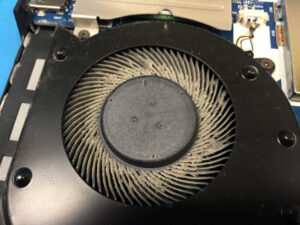
Dust buildup – Dust and debris block the fan blades and increase resistance, accelerating motor wear.
Electrical damage – Short circuits, power surges or motherboard control failures may cause the fan to stop working completely.
Mechanical damage – Dropping the laptop or damaging the chassis near the cooling system may deform the fan.
How does laptop fan replacement work at LaptopFix Warsaw?
At LaptopFix – Laptop Repair Service Warsaw Ochota:
- We perform free diagnostics (10–15 minutes).
- We check operating temperatures and sensor readings.
- We disassemble the chassis and cooling system.
- We replace the damaged fan with a new one matched to the laptop model.
- We reinstall the cooling system and perform stress tests.
If necessary, we also service the heatsink to restore full cooling performance.
Why you shouldn’t delay fan replacement
A faulty fan causes constant overheating, which may lead to:
- CPU damage or graphics chip failure
- motherboard failure
- shortened battery lifespan
- unstable system performance
Quick repair can help avoid much more expensive damage.
Laptop fan replacement – how much does it cost?
The cost of fan replacement depends on several factors, including:
- the laptop model and fan availability
- cooling system design (fan sold separately or combined with the heatsink)
- the complexity of laptop disassembly
- the condition of other cooling components
- whether additional maintenance is required
At LaptopFix – Laptop Repair Service Warsaw, we provide free diagnostics and a repair estimate before starting any repair. Customers always receive full pricing information before making a decision.
Frequently asked questions about laptop fan replacement (FAQ)
Not always. Sometimes cleaning is enough. However, if the noise comes from worn bearings, replacement is necessary.
For most laptop models, 1–3 business days.
No. Fan replacement does not cause data loss.
Yes, we provide a warranty on the repair service.
No. It may also be caused by a clogged heatsink or worn thermal paste. That’s why we always perform full diagnostics.
Laptop Fan Replacement Warsaw Ochota – Visit Us
If your laptop is noisy, overheating or shutting down during use – visit LaptopFix Laptop Repair Service Warsaw at 132 Grójecka Street. 📞 507 255 608
Free diagnostics within 10–15 minutes and fast fan replacement with temperature testing after the repair.
Our Repairs – Laptop Fan Replacement
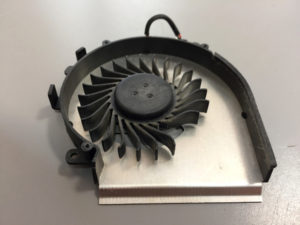
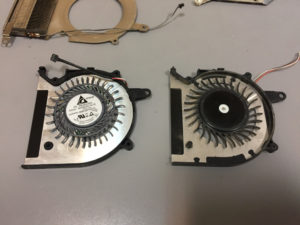
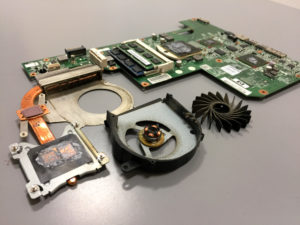
Below you can see examples of laptop cooling fan replacements performed at our repair service in Warsaw. The photos show, among others, removal of damaged and noisy fans as well as installation of new components matched to specific laptop models.



Related services
Laptop cooling system cleaning
Regular cooling system cleaning helps prevent overheating, performance drops, and damage to the motherboard or graphics chip.
Laptop motherboard repair
We specialize in power circuit repairs, short circuit removal, and replacement of damaged SMD components without replacing the entire motherboard.
Is your laptop noisy or the fan not working?
If the fan in your laptop is making noise, stopping unexpectedly or no longer working,
we provide professional laptop fan replacement.
This restores proper cooling performance.
Improved laptop cooling
Warranty on the repair
132 Grójecka Street
02-390 Warsaw
Sat. – Sun.: Closed